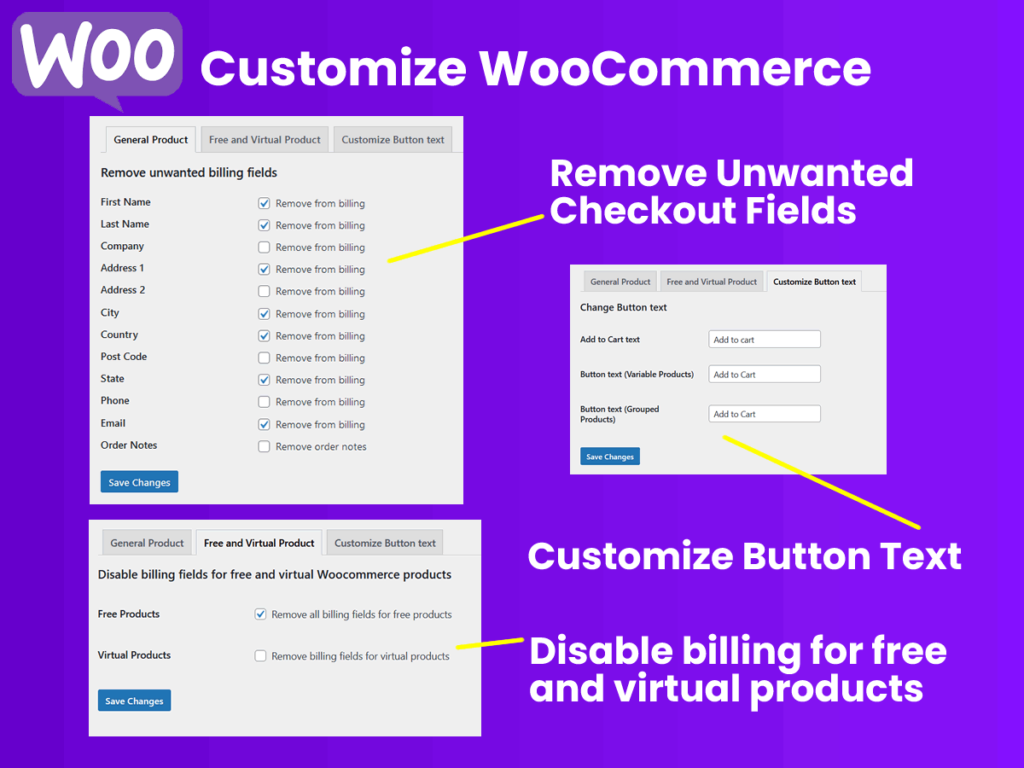
The default WooCommerce checkout includes numerous fields that are unnecessary for many transactions, leading to higher cart abandonment rates. The plugin features a General Product settings tab designed to let you remove unwanted billing fields instantly. Using a simple checkbox interface, administrators can disable specific data requirements, including First Name, Last Name, Company, Address 1, Address 2, City, Country, Post Code, State, Phone, Email, and Order Notes. This streamlined approach is especially effective when selling digital assets, software, or services where physical shipping addresses are completely irrelevant.
2. Smart Billing for Free & Virtual Products
Offering lead magnets, zero-cost items, or purely digital downloads should not force a customer through a rigorous, multi-step billing form. Within the Free and Virtual Product tab, the plugin introduces smart conditional rules to bypass these barriers. By checking a single box, you can entirely disable and remove all billing fields specifically for free WooCommerce products or for products marked as virtual. This creates a frictionless, one-click experience for digital goods, drastically improving email capture rates and digital product distribution.
3. Dynamic Button Text Customization
A generic “Add to Cart” button does not always align with every business model or product type. The Customize Button text tab grants you direct control over your product page calls-to-action. You can easily replace the default labels with custom text tailored to specific inventory types, with dedicated input fields for standard Add to Cart text, Button text for Variable Products, and Button text for Grouped Products. Whether you are prompting users to “Download Theme,” “Subscribe Now,” or “View Options,” you can adapt the button phrasing to match the specific conversion goal of the product page.